7.1 What We Protect You From
SynapseOS is a learning project, not a finished commercial product, and its approach to security reflects that honestly rather than overselling it.
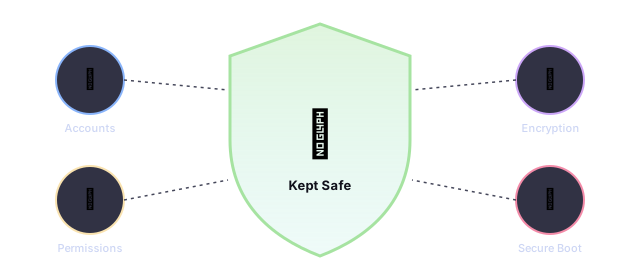
What's Handled
- Files and folders check who's allowed to read or change them before granting access
- Logging into an account requires the correct password first — there's no way around that check
- Secure web browsing traffic is scrambled so it can't be casually read by someone snooping on the network
What's Not Handled Yet
- Advanced tricks a malicious program could use to attack the system from the inside
- Confirming a website's identity during secure browsing (see 7.6)
- Protecting against someone with physical access tampering with the memory directly
- Protecting against someone physically stealing or opening the computer — that's simply out of scope
7.2 Who's Allowed to Do What
SynapseOS uses the same familiar account system found in Linux and macOS: every account has an owner identity, and the system checks that identity before allowing sensitive actions.
| Account | Description |
|---|---|
| root (built-in) | The one account that's always present and can never be deleted. It's allowed to do anything to any file, no questions asked. |
| Everyday accounts | Created by you during first-time setup, or added later from the terminal. Limited to their own files unless given permission. |
Only one account can be logged in at a time. Switching to a different account always requires typing that account's correct password first.
7.3 Permission Checks
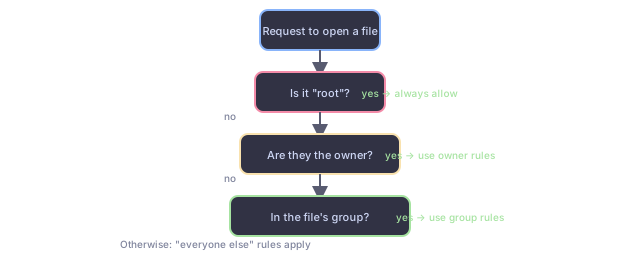
Whenever a program tries to open or change a file, SynapseOS checks, in order:
- Is the logged-in account "root"? If so, always allow it.
- Is the logged-in account the file's owner? If so, use the owner's permission settings.
- Does the account belong to the file's group? If so, use the group's permission settings.
- Otherwise, use the "everyone else" permission settings.
Only the file's owner (or root) is allowed to change who owns a file or adjust its permission settings — the same rule you'd expect on any modern computer.
7.4 Shared Space, Shared Risk
7.5 Secure Boot
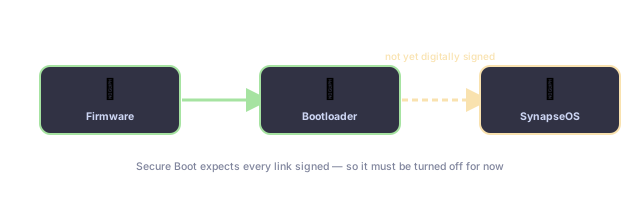
Many modern PCs have a feature called "Secure Boot" that only allows digitally signed, pre-approved software to start up. SynapseOS isn't signed this way yet, so Secure Boot needs to be turned off in your computer's startup settings before SynapseOS will boot.
Separately, SynapseOS does double-check that its bootloader handed off control correctly (see Chapter 3 → The Bootloader) — but that's a basic correctness check, not a security safeguard.
7.6 The Encryption Toolkit
SynapseOS includes its own hand-built set of encryption tools, used mainly to protect secure web browsing traffic. None of it depends on any outside encryption library — every algorithm was implemented and tested against the same standard test cases that professional cryptography libraries use, to make sure the results match exactly.
Account Passwords
7.7 Keeping Watch
SynapseOS doesn't yet have a dedicated security alarm system watching for suspicious activity. It does keep a running diagnostic log of what's happening during startup and while it's running (see Everyday Use → Keeping Records), but there's no separate "security log" specifically flagging break-in attempts today.