1.1 What Is SynapseOS?
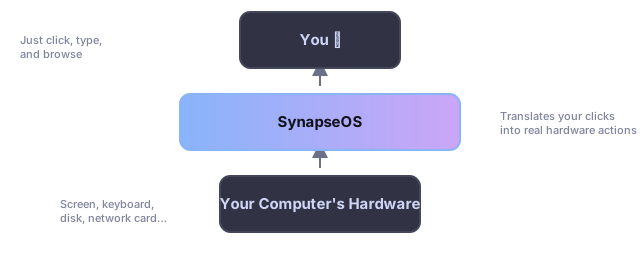
SynapseOS is a computer operating system — the same kind of software as Windows, macOS, or Linux — built entirely from scratch by a small team as a learning project. An operating system is the software that starts the moment you turn a computer on: it draws the desktop you see, keeps track of your files, lets you connect to the internet, and manages every other program you run.
Most operating systems are built on decades of existing code. SynapseOS took the opposite path: nothing was reused. Every single piece — from the very first instruction that runs after you press the power button, all the way up to the windows, the web browser, and the little startup jingle — was written by hand for this project. Think of it less like assembling furniture from a kit, and more like growing the tree, milling the wood, and building the furniture yourself.
1.2 What We Set Out to Build
| Goal | What It Means |
|---|---|
| Self-contained | SynapseOS doesn't borrow code from any other operating system. Everything it needs to run is included on the single disc you boot from. |
| Works on ordinary computers | It boots the same way modern PCs expect (through a system called UEFI), so it can start on real hardware, not just special test computers. |
| Graphical from the start | You don't have to type commands to get going — a graphical desktop appears automatically as soon as it's ready. |
| Easy to read and learn from | Each part of the system was written and organized so that someone new to the project can follow how it fits together. |
| Fails safely | If something the system needs isn't available, it stops and reports the problem clearly rather than continuing in a broken state. |
1.3 Our Guiding Principles
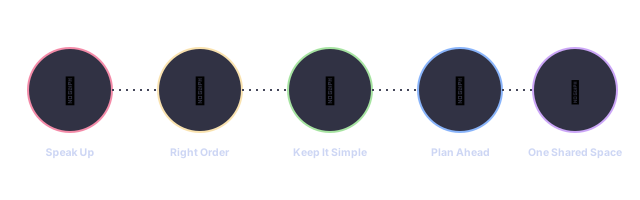
Speak Up When Something's Wrong
Every step of starting up SynapseOS reports what it's doing. If a required piece of hardware or setting is missing, the system stops immediately instead of quietly limping along — the same way a car's dashboard warning light is better than silently losing brakes.
Do Things in the Right Order
There's one clear "master checklist" the system works through every time it starts, so nothing happens before the thing it depends on is ready — similar to how you wouldn't turn on a stove before checking there's a pot on it.
Keep It Simple Under the Hood
SynapseOS deliberately avoids some of the more exotic tricks found in professional processors, favoring simple, predictable behavior over squeezing out maximum performance. This keeps the system easier to understand and less likely to behave unpredictably.
Plan Memory Ahead of Time
Rather than growing and shrinking its memory usage unpredictably while running, SynapseOS reserves fixed-size spaces for the things it knows it will need — similar to a moving truck that's packed with labeled boxes instead of loose items thrown in at random.
One Shared Space
Every part of SynapseOS — the desktop, the browser, the disk driver — currently runs together in the same protected space, with no walls between them. This keeps the design simple for now, though it means one broken part could affect the whole system (see Keeping You Safe → Shared Space, Shared Risk).
1.4 Where It Runs
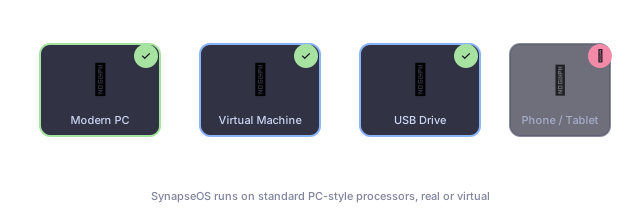
| Setup | Status | Notes |
|---|---|---|
| Modern PC hardware (UEFI) | Best supported | Tested in a virtual machine and on a real computer, started from a USB drive |
| Older PC hardware (Legacy BIOS) | Supported | Works as a fallback on machines that don't use the newer UEFI startup method |
| USB flash drive boot | Supported | The whole system can be written to a USB stick and started from it directly |
| Phones, tablets, Macs with Apple chips | Not supported | SynapseOS is built specifically for traditional PC processors |
1.5 What You'll Need
| Item | Minimum | Why |
|---|---|---|
| Memory (RAM) | 512 MB | Enough room for the desktop, browser, and everything else to run comfortably |
| Storage | Any hard disk (optional) | Only needed if you want to install SynapseOS permanently; it can run entirely from a USB drive without one |
| Screen | Any standard monitor | The system automatically adapts to your screen's size |
| Keyboard | USB or older-style (PS/2) | Both common keyboard connection types are supported |
| Internet | A supported network card (optional) | Needed only if you want to use the built-in web browser |
| Speakers | A supported sound chip (optional) | Needed only if you want startup sounds and music playback |